
Offering a Virtual Mailbox Add-On to Existing Physical Box Holders
Overview
As an partner with Anytime Mailbox, you can upsell virtual mailbox services to customers who already rent a physical mailbox from you. This simple enhancement allows your physical box holders to view and manage their mail online, adding convenience and value to their existing subscription.
Why Offer This Add-On?
Increase Revenue: Create an additional stream by offering virtual access to existing customers.
Enhance Customer Experience: Provide your customers with the ability to manage their mail remotely.
Stay Competitive: Many customers seek hybrid mail solutions; this helps you meet that demand.
Getting Started
1. Create a Dedicated Service Plan
To enable virtual mailbox features for physical box holders, you must first set up a dedicated service plan. This ensures that the upsell is structured and visible to the right audience.
Follow this guide: How to Add a Service Plan
Important Settings:
Under Visibility, choose:
"Partner Branded Signup URL for Existing Customers"
This setting ensures only your current physical box holders will see the offer when signing up.
Guide Customers to Your Custom Signup Link
Ensure your customers are using your custom website link when signing up for the virtual add-on. This link directs them through the correct branded flow.
During signup, customers will be prompted to:
Enter their existing physical box number
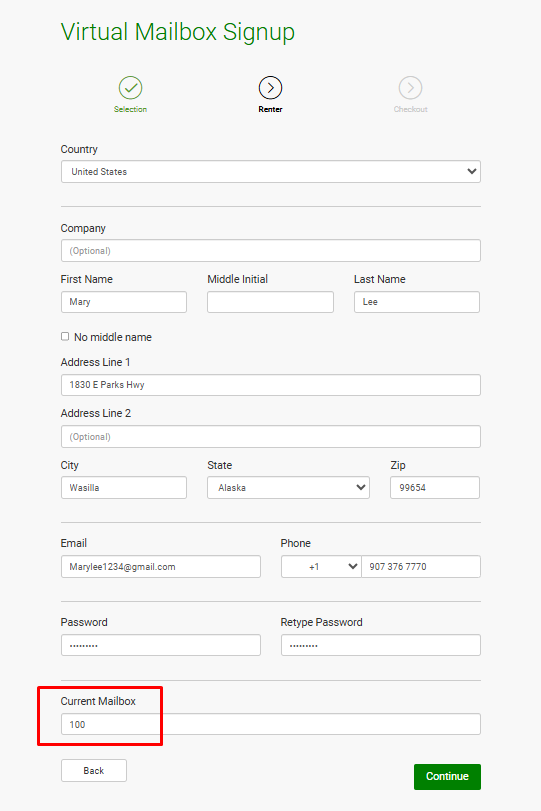
Follow the step-by-step prompts to complete the registration
No additional verification is necessary—they’re simply extending their current mailbox services.
✅ Best Practices
Train Your Staff: Make sure your team can explain the virtual add-on clearly to customers.
Promote the Upgrade: Mention the virtual mailbox option in your welcome emails, at the front desk, or through posters in your lobby.
Need Help?
If you have questions about configuring service plans or your custom signup link, please reach out to our support team for assistance.